理解RxJava的线程模型
Scheduler、observeOn和subscribeOn
目录 [−]
ReactiveX是Reactive Extensions的缩写,一般简写为Rx,最初是LINQ的一个扩展,由微软的架构师Erik Meijer领导的团队开发,在2012年11月开源,Rx是一个编程模型,目标是提供一致的编程接口,帮助开发者更方便的处理异步数据流,Rx库支持.NET、JavaScript和C++,Rx近几年越来越流行了,现在已经支持几乎全部的流行编程语言了,Rx的大部分语言库由ReactiveX这个组织负责维护,比较流行的有RxJava/RxJS/Rx.NET,社区网站是 reactivex.io 。
Netflix参考微软的Reactive Extensions创建了Java的实现RxJava,主要是为了简化服务器端的并发。2013年二月份,Ben Christensen 和 Jafar Husain发在Netflix技术博客的一篇文章第一次向世界展示了RxJava。
RxJava也在Android开发中得到广泛的应用。
ReactiveX
虽然RxJava是为异步编程实现的库,但是如果不清楚它的使用,或者错误地使用了它的线程调度,反而不能很好的利用它的异步编程提到系统的处理速度。本文通过实例演示错误的RxJava的使用,解释RxJava的线程调度模型,主要介绍Scheduler、observeOn和subscribeOn的使用。
本文中的例子以并发发送http request请求为基础,通过性能检验RxJava的线程调度。
第一个例子,性能超好? 我们首先看第一个例子:
1
2
3
4
5
6
7
8
9
10
11
12
13
14
15
16
17
18
19
20
21
public static void testRxJavaWithoutBlocking (int count) throws Exception { CountDownLatch finishedLatch = new CountDownLatch (1 ); long t = System.nanoTime(); Observable.range(0 , count).map(i -> { return 200 ; }).subscribe(statusCode -> { }, error -> { }, () -> { finishedLatch.countDown(); }); finishedLatch.await(); t = (System.nanoTime() - t) / 1000000 ; System.out.println("RxJavaWithoutBlocking TPS: " + count * 1000 / t); }
这个例子是一个基本的RxJava的使用,利用Range创建一个Observable, subscriber处理接收的数据。因为整个逻辑没有阻塞,程序运行起来很快,
RxJavaWithoutBlocking TPS: 7692307 。
加上业务的模拟,性能超差 上面的例子是一个理想化的程序,没雨任何阻塞。我们模拟一下实际的应用,加上业务处理。
业务逻辑是发送一个http的请求,httpserver是一个模拟器,针对每个请求有30毫秒的延迟。subscriber统计请求结果:
1
2
3
4
5
6
7
8
9
10
11
12
13
14
15
16
17
18
19
20
21
22
23
24
25
26
27
28
29
30
31
32
33
34
35
36
public static void testRxJavaWithBlocking (int count) throws Exception { URL url = new URL ("http://127.0.0.1:8999/" ); CountDownLatch finishedLatch = new CountDownLatch (1 ); long t = System.nanoTime(); Observable.range(0 , count).map(i -> { try { HttpURLConnection conn = (HttpURLConnection) url.openConnection(); conn.setRequestMethod("GET" ); int responseCode = conn.getResponseCode(); BufferedReader in = new BufferedReader (new InputStreamReader (conn.getInputStream())); String inputLine; while ((inputLine = in.readLine()) != null ) { } in.close(); return responseCode; } catch (Exception ex) { return -1 ; } }).subscribe(statusCode -> { }, error -> { }, () -> { finishedLatch.countDown(); }); finishedLatch.await(); t = (System.nanoTime() - t) / 1000000 ; System.out.println("RxJavaWithBlocking TPS: " + count * 1000 / t); }
运行结果如下:
RxJavaWithBlocking TPS: 29 。
@#¥%%……&!
性能怎么突降呢,第一个例子看起来性能超好啊,http server只增加了一个30毫秒的延迟,导致这个方法每秒只能处理29个请求。
如果我们估算一下, 29*30= 870 毫秒,大约1秒,正好和单个线程发送处理所有的请求的TPS差不多。
加上调度器,不起作用? 如果你对subscribeOn和observeOn方法有些印象的话,可能会尝试使用调度器去解决:
1
2
3
4
5
6
7
8
9
10
11
12
13
14
15
16
17
18
19
20
21
22
23
24
25
26
27
28
29
30
31
32
33
34
35
36
public static void testRxJavaWithBlocking (int count) throws Exception { URL url = new URL ("http://127.0.0.1:8999/" ); CountDownLatch finishedLatch = new CountDownLatch (1 ); long t = System.nanoTime(); Observable.range(0 , count).map(i -> { try { HttpURLConnection conn = (HttpURLConnection) url.openConnection(); conn.setRequestMethod("GET" ); int responseCode = conn.getResponseCode(); BufferedReader in = new BufferedReader (new InputStreamReader (conn.getInputStream())); String inputLine; while ((inputLine = in.readLine()) != null ) { } in.close(); return responseCode; } catch (Exception ex) { return -1 ; } }).subscribeOn(Schedulers.io()).observeOn(Schedulers.computation()).subscribe(statusCode -> { }, error -> { }, () -> { finishedLatch.countDown(); }); finishedLatch.await(); t = (System.nanoTime() - t) / 1000000 ; System.out.println("RxJavaWithBlocking TPS: " + count * 1000 / t); }
加上.subscribeOn(Schedulers.io()).observeOn(Schedulers.computation())看一下性能:
RxJavaWithBlocking TPS: 30 。
性能没有改观,是时候了解一下RxJava线程调度的问题了。
RxJava的线程模型 首先,依照Observable Contract , onNext是顺序执行的,不会同时由多个线程并发执行。
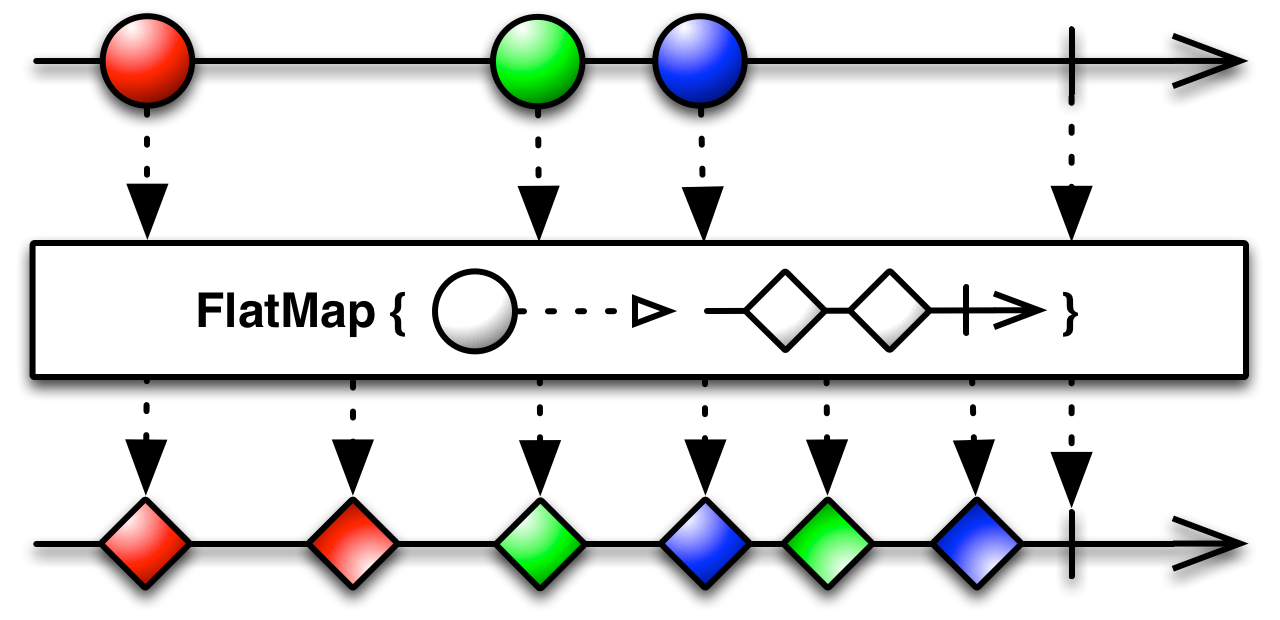
另一种解决方案 我们已经清楚了要并行执行提高吞吐率的解决办法就是创建多个Observable并且并发执行。基于这种解决方案,我们还可以有其它的解决方案。
上一方案中利用flatmap创建多个Observable,针对我们的例子,我们何不直接创建多个Observable呢?
1
2
3
4
5
6
7
8
9
10
11
12
13
14
15
16
17
18
19
20
21
22
23
24
25
26
27
28
29
30
31
32
33
34
35
36
37
38
39
40
41
42
43
public static void testRxJavaWithParallel (int count) throws Exception { ExecutorService es = Executors.newFixedThreadPool(200 , new ThreadFactoryBuilder ().setNameFormat("SubscribeOn-%d" ).build()); URL url = new URL ("http://127.0.0.1:8999/" ); CountDownLatch finishedLatch = new CountDownLatch (count); long t = System.nanoTime(); for (int k = 0 ; k < count; k++) { Observable.just(k).map(i -> { try { HttpURLConnection conn = (HttpURLConnection) url.openConnection(); conn.setRequestMethod("GET" ); int responseCode = conn.getResponseCode(); BufferedReader in = new BufferedReader (new InputStreamReader (conn.getInputStream())); String inputLine; while ((inputLine = in.readLine()) != null ) { } in.close(); return responseCode; } catch (Exception ex) { return -1 ; } }).subscribeOn(Schedulers.from(es)).observeOn(Schedulers.computation()).subscribe(statusCode -> { }, error -> { }, () -> { finishedLatch.countDown(); }); } finishedLatch.await(); t = (System.nanoTime() - t) / 1000000 ; System.out.println("RxJavaWithParallel TPS: " + count * 1000 / t); es.shutdownNow(); }
性能更好一点:
RxJavaWithParallel2 TPS: 4716 。
这个例子没有使用Schedulers.io()作为它的调度器,这是因为如果在大并发的情况下,可能会出现创建过多的线程导致资源不错,所以我们限定使用200个线程。
总结
subscribeOn() 改变的Observable运行(operate)使用的调度器,多次调用无效。observeOn() 改变Observable发送notifications的调度器,会影响后续的操作,可以多次调用默认情况下, 操作链使用的线程是调用subscribe()的线程
Schedulers提供了多个调度器,可以并行运行多个Observable使用RxJava可以实现异步编程,但是依然要小心线程阻塞。而且由于这种异步的编程,调试代码可能更加的困难
参考文档
http://reactivex.io/documentation/contract.html http://reactivex.io/documentation/operators/subscribeon.html 中文翻译 http://reactivex.io/documentation/operators/observeon.html 中文翻译 http://reactivex.io/documentation/scheduler.html http://tomstechnicalblog.blogspot.com/2016/02/rxjava-understanding-observeon-and.html http://tomstechnicalblog.blogspot.com/2015/11/rxjava-achieving-parallelization.html https://medium.com/@diolor/observe-in-the-correct-thread-1939bb9bb9d2 中文翻译 https://github.com/mcxiaoke/RxDocs