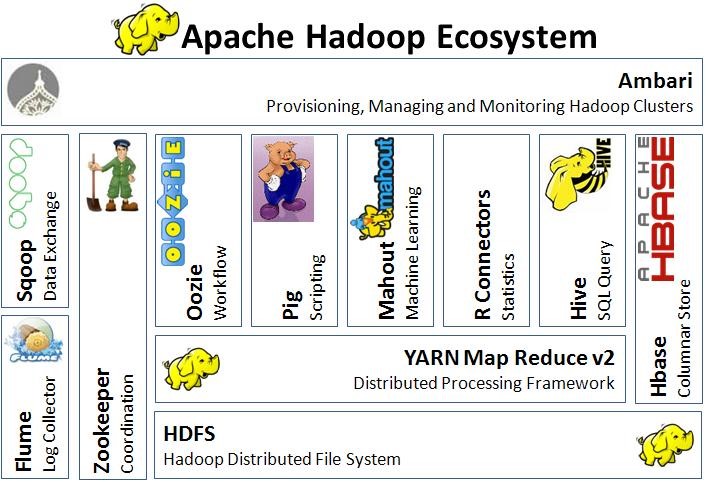
ZooKeeper, Kafka和Spark是当下流行的大数据平台工具之一。这两年得到飞速的发展,国内厂商也越来越多的使用它们。
官方网站提供了很多的代码例子,互联网上也有很多的开发例子,你可以很容易的学习如果编写基于这些平台框架的技术。
所有的例子都可以在 这里 找到。
为ZooKeeper应用编写单元测试 一般我们不直接使用ZooKeeper的API编写Client代码,而是使用Curator或者i0itec-zkclient等包装的API开发。
有几种方式可以实现一个ZooKeeper simulator。
Curator TestingServer
1 2 3 4 5 <dependency > <groupId > org.apache.curator</groupId > <artifactId > curator-test</artifactId > <version > ${curator.version}</version > </dependency >
测试代码如下:
1
2
3
4
5
6
7
8
9
10
11
12
13
14
15
16
17
18
19
20
21
22
23
24
25
26
27
public class CuratorAppTest { private TestingServer server; @BeforeClass public void setUp () throws Exception { server = new TestingServer (); server.start(); } @AfterClass public void tearDown () throws IOException { server.stop(); } @Test public void testSetAndGetData () { CuratorApp app = new CuratorApp (); String payload = System.currentTimeMillis() + "" ; String result = app.setAndGetData(server.getConnectString(), payload); assertEquals(result, payload); } @Test public void testWatch () throws Exception { CuratorApp app = new CuratorApp (); app.watch(server.getConnectString()); } }
EmbeddedZookeeper
1
2
3
4
5
6
7
8
9
10
11
12
13
14
15
16
17
18
19
20
21
22
23
24
25
26
package kafka.zkimport org.apache.zookeeper.server.ZooKeeperServer import org.apache.zookeeper.server.NIOServerCnxnFactory import kafka.utils.TestUtils import java.net.InetSocketAddress import kafka.utils.Utils import org.apache.kafka.common.utils.Utils .getPortclass EmbeddedZookeeper (val connectString: String ) val snapshotDir = TestUtils .tempDir() val logDir = TestUtils .tempDir() val tickTime = 500 val zookeeper = new ZooKeeperServer (snapshotDir, logDir, tickTime) val factory = new NIOServerCnxnFactory () factory.configure(new InetSocketAddress ("127.0.0.1" , getPort(connectString)), 0 ) factory.startup(zookeeper) def shutdown Utils .swallow(zookeeper.shutdown()) Utils .swallow(factory.shutdown()) Utils .rm(logDir) Utils .rm(snapshotDir) } }
测试工具类:
1
2
3
4
5
6
7
8
9
10
11
12
13
14
15
16
17
18
19
20
21
22
23
24
25
26
package kafka.zkimport org.scalatest.junit.JUnit3Suite import org.I0Itec .zkclient.ZkClient import kafka.utils.{ZKStringSerializer , TestZKUtils , Utils }trait ZooKeeperTestHarness extends JUnit3Suite val zkConnect: String = TestZKUtils .zookeeperConnect var zookeeper: EmbeddedZookeeper = null var zkClient: ZkClient = null val zkConnectionTimeout = 6000 val zkSessionTimeout = 6000 override def setUp super .setUp zookeeper = new EmbeddedZookeeper (zkConnect) zkClient = new ZkClient (zookeeper.connectString, zkSessionTimeout, zkConnectionTimeout, ZKStringSerializer ) } override def tearDown Utils .swallow(zkClient.close()) Utils .swallow(zookeeper.shutdown()) super .tearDown } }
自己实现org.apache.zookeeper.server.ZooKeeperServer和org.apache.zookeeper.server.NIOServerCnxnFactory。gist stackoverflow 上讨论的:
1
2
3
4
5
6
7
8
9
10
11
12
13
14
15
16
17
18
19
20
21
22
Properties startupProperties = ...QuorumPeerConfig quorumConfiguration = new QuorumPeerConfig ();try { quorumConfiguration.parseProperties(startupProperties); } catch (Exception e) { throw new RuntimeException (e); } zooKeeperServer = new ZooKeeperServerMain (); final ServerConfig configuration = new ServerConfig ();configuration.readFrom(quorumConfiguration); new Thread () { public void run () { try { zooKeeperServer.runFromConfig(configuration); } catch (IOException e) { log.error("ZooKeeper Failed" , e); } } }.start();
为Kafka应用编写单元测试 Kafka代码本身就提供了单元测试,所以我们编写Kafka producer应用和consumer应用时可以参考这些应用。kafka单元测试类
1
2
3
4
5
6
7
8
9
10
11
12
13
14
15
16
17
18
trait KafkaServerTestHarness extends JUnit3Suite with ZooKeeperTestHarness val configs: List [KafkaConfig ] var servers: List [KafkaServer ] = null override def setUp super .setUp if (configs.size <= 0 ) throw new KafkaException ("Must suply at least one server config." ) servers = configs.map(TestUtils .createServer(_)) } override def tearDown servers.map(server => server.shutdown()) servers.map(server => server.config.logDirs.map(Utils .rm(_))) super .tearDown } }
以及提供一个初始化好producer和consumer的Trait:
1
2
3
4
5
6
7
8
9
10
11
12
13
14
15
16
17
18
19
trait ProducerConsumerTestHarness extends JUnit3Suite with KafkaServerTestHarness val port: Int val host = "localhost" var producer: Producer [String , String ] = null var consumer: SimpleConsumer = null override def setUp super .setUp val props = TestUtils .getProducerConfig(TestUtils .getBrokerListStrFromConfigs(configs), "kafka.utils.StaticPartitioner" ) producer = new Producer (new ProducerConfig (props)) consumer = new SimpleConsumer (host, port, 1000000 , 64 *1024 , "" ) } override def tearDown producer.close() consumer.close() super .tearDown } }
如果你想在代码中使用它们,你需要引入:
1 2 3 4 5 6 7 <dependency > <groupId > org.apache.kafka</groupId > <artifactId > kafka_2.10</artifactId > <classifier > test</classifier > <scope > test</scope > <version > ${kafka.version}</version > </dependency >
如果你想在Java直接实现这些trait是不可以的,这些Trait都有实现方法,在Java中无法直接使用,可能你需要把trait改为abstract class。 或者你使用它的TestUtils创建。
1
2
3
4
5
6
7
8
9
10
11
12
13
14
15
16
17
18
19
20
21
22
23
24
25
26
27
28
29
30
31
32
33
34
35
36
37
38
39
40
41
42
43
44
45
46
47
48
49
50
51
52
53
54
55
@BeforeClass public void setup () { ...... } @AfterClass public void teardown () { ...... } @Test public void testReceive () { Properties consumerProps = TestUtils.createConsumerProperties(zkServer.connectString(), "group_1" , "consumer_id" , 1000 ); consumerProps.putAll(kafkaProps); ConsumerConfig consumerConfig = new ConsumerConfig (consumerProps); ConsumerConnector consumerConnector = Consumer.createJavaConsumerConnector(consumerConfig); Map<String, Integer> topicCountMap = new HashMap <String, Integer>(); topicCountMap.put(topic, new Integer (1 )); Map<String, List<KafkaStream<byte [], byte []>>> consumerMap = consumerConnector.createMessageStreams(topicCountMap); List<KafkaStream<byte [], byte []>> streams = consumerMap.get(topic); ExecutorService executor = Executors.newFixedThreadPool(2 ); int threadNumber = 0 ; for (final KafkaStream<byte [], byte []> stream : streams) { executor.submit(new ConsumerThread (stream, threadNumber)); threadNumber++; } Properties properties = TestUtils.getProducerConfig("localhost:" + port); properties.put("serializer.class" , StringEncoder.class.getCanonicalName()); ProducerConfig pConfig = new ProducerConfig (properties); Producer<Integer, String> producer = new Producer <>(pConfig); for (int i = 0 ; i < 10 ; i++) { KeyedMessage<Integer, String> data = new KeyedMessage <>(topic, "test-message-" + i); List<KeyedMessage<Integer, String>> messages = new ArrayList <KeyedMessage<Integer, String>>(); messages.add(data); producer.send(scala.collection.JavaConversions.asScalaBuffer(messages)); } try { Thread.sleep(20000 ); } catch (InterruptedException e) { e.printStackTrace(); } executor.shutdownNow(); producer.close(); }
为Spark应用编写单元测试 如果是为普通的Spark应用编写单元测试代码, 比较简单,创建SparkContext时只需将master设为local即可。确保在finally或者teardown方法中调用SparkContext.stop(),因为Spark不允许在同一个程序中拥有两个SparkContext。
1
2
3
4
5
6
7
8
9
10
11
12
13
14
15
16
17
18
19
20
21
22
23
24
25
26
27
28
29
30
31
32
33
34
35
public final class JavaSparkPi { public static void main (String[] args) throws Exception { double pi = calculatePi(args); System.out.println("Pi is roughly " + pi); } public static double calculatePi (String[] args) { SparkConf sparkConf = new SparkConf ().setAppName("JavaSparkPi" ); JavaSparkContext jsc = new JavaSparkContext (sparkConf); int slices = (args.length == 1 ) ? Integer.parseInt(args[0 ]) : 2 ; int n = 100000 * slices; List<Integer> l = new ArrayList <Integer>(n); for (int i = 0 ; i < n; i++) { l.add(i); } JavaRDD<Integer> dataSet = jsc.parallelize(l, slices); int count = dataSet.map(new Function <Integer, Integer>() { @Override public Integer call (Integer integer) { double x = Math.random() * 2 - 1 ; double y = Math.random() * 2 - 1 ; return (x * x + y * y < 1 ) ? 1 : 0 ; } }).reduce(new Function2 <Integer, Integer, Integer>() { @Override public Integer call (Integer integer, Integer integer2) { return integer + integer2; } }); double pi = 4.0 * count / n; jsc.stop(); return pi; } }
单元测试类:
1
2
3
4
5
6
7
8
9
10
11
12
13
14
15
16
17
18
public class JavaSparkPiTest { @Test public void testPi () { Properties props = System.getProperties(); props.setProperty("spark.master" , "local[4]" ); props.setProperty("spark.rdd.compress" , "true" ); props.setProperty("spark.executor.memory" , "1g" ); try { double pi = JavaSparkPi.calculatePi(new String []{"1" }); assertTrue((pi -3.14 ) < 1 ); } catch (Exception e) { fail(e.getMessage(),e); } } }
对于Spark Streaming应用, 单元测试相对复杂,因为你需要集成其它的框架。